I rebuilt Bash from source. These notes cover downloading the source, compiling it and switching to the new shell.
I used Bash 5.1.16 in a Kali virtual machine. It was already an older release when I documented this; choose the version appropriate to your own environment.
# Check the installed shell and Bash version
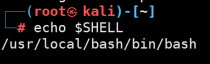
First check the login shell configured for the account:
echo "$SHELL" |

$SHELL normally contains the login shell path. My guest used zsh by default, but also had Bash installed. Check its version separately:
bash --version |
My installed version was Bash 5.1.16:

# Download and install Bash
I wanted to select a build option explicitly, so I built from source. You’ll need a C compiler and make. On Kali, sudo apt install build-essential installs the build tools.
# Download
Find the 5.1.16 source archive in the GNU Bash download directory and download it with wget:
wget https://ftp.gnu.org/gnu/bash/bash-5.1.16.tar.gz |

# Extract the source
tar -zxvf bash-5.1.16.tar.gz |
This creates a bash-5.1.16 directory in the working directory:

Change into it:
cd bash-5.1.16 |
# Configure the build
Select a separate installation prefix and explicitly enable network redirections:
./configure --prefix=/usr/local/bash --enable-net-redirections |
The --prefix option puts the installation under /usr/local/bash , leaving the system’s existing Bash binary in place.

# Compile and install
Build the configured source:
make |

After the build succeeds, install it under the selected prefix:
sudo make install |
I was running as root in the screenshot, so the command there is simply make install .

# Use the new shell
You can launch it directly without changing the account’s login shell:
/usr/local/bash/bin/bash |
To make it your login shell, check whether /etc/shells already lists /usr/local/bash/bin/bash . If it’s absent, append it:
echo '/usr/local/bash/bin/bash' | sudo tee -a /etc/shells |
Set the current account’s login shell:
chsh -s /usr/local/bash/bin/bash |
Log out and back in for the change to take effect. A full reboot isn’t necessary. Run echo "$SHELL" after logging back in to check the configured path.