After installing Typecho I tried the EasyBe theme and changed some of its settings.
These notes describe the version I used in 2022. The examples refer to this historical revision. The repository has since changed considerably. Check the configuration and third-party integrations in your own version before copying these snippets.
# Installing EasyBe
I covered Typecho itself in Installing and configuring Typecho. Download the appropriate theme archive from the EasyBe repository, use BT Panel to upload it to usr/themes/ under the Typecho installation and extract it. The files should be in a single theme folder without an extra archive directory around them. Enable it under Control Panel → Appearance.
# Configuring EasyBe
# A small gripe
I enabled the theme and got a blank home page. I suspect that release was still fairly early in development. Other Typecho themes I’d tried at least showed a basic page straight away, so this one threw me. It took me a while to think of opening the appearance settings ( ̄_ ̄|||).
Once I filled in the configuration from the author’s notes, the page finally appeared. A shaky start, but I quite liked the result.


# The settings
# Avatar, nickname, occupation and location
Fill in your details in the appearance settings and save. They appear at the top of the sidebar.
# CNZZ analytics
Leave this field blank if you don’t need analytics. The theme accepts a tracking snippet; its original display position was below the footer links.
According to Umeng’s announcement, U-Web stopped providing free website analytics on 10 May 2022. This explains the old theme field. If you still want to use the service, check what it offers and get the snippet from your dashboard.
# Site filings
These fields display filings you have already obtained. ICP filing and public security registration are separate; each number needs its corresponding lookup link.
Link an ICP number to the MIIT filing system. Substitute your full number in this example:
<a href="https://beian.miit.gov.cn/" target="_blank" rel="noopener noreferrer">你的 ICP 备案号</a> |
For a public security registration use the display code, registration number and lookup link from the national public security platform. Adding a display snippet doesn’t complete the filing itself.
# Global configuration
Filling in this section fixed my blank home page. It brings together the avatar, cover images, animations and plenty of other settings.
Several image links in the old configuration had expired. This example uses the background and avatar bundled with that revision. Replace them with your own images.
Here’s a complete example based on the original. It still uses the default triangular loader. The hexagonal one I made is further down. Paste the example into the global configuration field in the appearance settings, then change the nickname, start date, avatar and links to your own.
<!-- global var --> | |
<script type="text/javascript"> | |
// 博客全局配置 | |
window.cnblogsConfig = { | |
//---- GitHub 文件源配置 ---- | |
GhUserName: 'wangyang0210', | |
GhRepositories: 'EasyBe', | |
GhVersions : '80e8d7f9b7acb7ab1318ac39cbfad7b0ed908edd', | |
//---- 基础信息配置 ----custom | |
blogUser : "。思索", | |
blogAvatar : | |
"https://cdn.jsdelivr.net/gh/wangyang0210/EasyBe@80e8d7f9b7acb7ab1318ac39cbfad7b0ed908edd/static/imgs/home_top_bg.jpg", | |
blogStartDate : "2019-8-1", | |
//---- 菜单配置 ---- | |
menuCustomList: { | |
}, | |
//---- 网站配置 ---- | |
webpageTitleOnblur : "(◍´꒳`◍) Hi, MyFriend", | |
webpageTitleOnblurTimeOut : 500, | |
webpageTitleFocus : "(*´∇`*) 欢迎回来!", | |
webpageTitleFocusTimeOut : 1000, | |
webpageIcon : "https://files.cnblogs.com/files/wangyang0210/blog_logo.gif", | |
//---- 进度条配置 ---- | |
progressBar: { | |
id : 'top-progress-bar', | |
color : '#77b6ff', | |
height : '2px', | |
duration: 0.2 | |
}, | |
//---- Loading 配置 ---- | |
loading: { | |
rebound: { | |
tension: 16, | |
friction: 5 | |
}, | |
spinner: { | |
id: 'spinner', | |
radius: 90, | |
sides: 3, | |
depth: 4, | |
colors: { | |
background: '#f0f0f0', | |
stroke: '#272633', | |
base: null, | |
child: '#272633' | |
}, | |
alwaysForward: true, // When false the spring will reverse normally. | |
restAt: 0.5, // A number from 0.1 to 0.9 || null for full rotation | |
renderBase: false | |
} | |
}, | |
//---- 页面动效配置 ---- | |
homeTopAnimationRendered: true, //true || false , 是否渲染主页头图动效 | |
homeTopAnimation: { // 主页头图动效设置 | |
radius: 15, | |
density: 0.2, | |
color: 'rgba(255,255,255, .2)', // 颜色设置,“random” 为随机颜色 | |
clearOffset: 0.3 | |
}, | |
essayTopAnimationRendered: true, //true || false , 是否渲染随笔页头图动效 | |
essayTopAnimation: { // 随笔页头图动效设置 | |
triW : 14, | |
triH : 20, | |
neighbours : ["side", "top", "bottom"], | |
speedTrailAppear : .1, | |
speedTrailDisappear : .1, | |
speedTriOpen : 1, | |
trailMaxLength : 30, | |
trailIntervalCreation : 100, | |
delayBeforeDisappear : 2, | |
colors: [ | |
'#96EDA6', '#5BC6A9', | |
'#38668C', '#374D84', | |
'#BED5CB', '#62ADC6', | |
'#8EE5DE', '#304E7B' | |
] | |
}, | |
bgAnimationRendered: true, //true || false , 是否渲染背景动效 | |
backgroundAnimation : { // 背景动效设置 | |
colorSaturation: "60%", | |
colorBrightness: "50%", | |
colorAlpha: 0.5, | |
colorCycleSpeed: 5, | |
verticalPosition: "random", | |
horizontalSpeed: 200, | |
ribbonCount: 3, | |
strokeSize: 0, | |
parallaxAmount: -0.2, | |
animateSections: true | |
}, | |
//---- 主页配置 ---- | |
homeTopImg : [ | |
"https://cdn.jsdelivr.net/gh/wangyang0210/EasyBe@80e8d7f9b7acb7ab1318ac39cbfad7b0ed908edd/static/imgs/home_top_bg.jpg" | |
], | |
homeBannerText: "", | |
//---- 随笔页配置 ---- | |
essayTopImg: [ | |
"https://cdn.jsdelivr.net/gh/wangyang0210/EasyBe@80e8d7f9b7acb7ab1318ac39cbfad7b0ed908edd/static/imgs/home_top_bg.jpg" | |
], | |
essayCodeHighlightingType: 'highlightjs', // 代码主题插件类型:cnblogs || highlightjs || prettify | |
essayCodeHighlighting: 'monokai-sublime', // 代码高亮主题,具体主题参考文档 | |
essaySuffix:{ // 随笔后缀处配置 | |
aboutHtml : '', // 关于博主,不配置使用默认 | |
copyrightHtml: '', // 版权声明,不配置使用默认 | |
}, | |
//---- 页脚配置 ---- | |
bottomBlogroll: [ // 友情链接,[[链接名,链接]....] | |
["EasyBe 项目", 'https://github.com/wangyang0210/EasyBe'], | |
], | |
bottomText: { // 页脚标语 | |
icon: "❤️", | |
left: "学无止境", | |
right: "谦卑而行" | |
}, | |
//---- 控制台输出 ---- | |
consoleList: [ | |
['wangyang0210 CNBlogs', 'https://www.cnblogs.com/wangyang0210'], | |
['wangyang0210 GitHub', 'https://github.com/wangyang0210'], | |
['wangyang0210 Email', '2752154874@qq.com'] | |
], | |
}; | |
// start cache | |
$.ajaxSetup({cache: true}); | |
// load loadingJs | |
$.getScript(getJsDelivrUrl('loading.js'), function () { | |
// Loading start | |
pageLoading.initRebound(); | |
pageLoading.initSpinner(); | |
pageLoading.spinner.init(pageLoading.spring, true); | |
$.getScript(getJsDelivrUrl('jquery.mCustomScrollbar.min.js'), function () { | |
$.getScript(getJsDelivrUrl('require.min.js'), function () { | |
$.getScript(getJsDelivrUrl('config.js'), function () { | |
var staticResource = [ | |
'optiscroll', 'ToProgress', 'rotate', | |
'snapSvg', 'classie', 'main4', 'tools']; | |
require(staticResource, function() { | |
require(['base'], function() { | |
(new Base).init(); | |
}); | |
}); | |
}); | |
}); | |
}); | |
}); | |
// get file url | |
function getJsDelivrUrl(file, directory) { | |
file = setFileNameMin(file, directory); | |
return 'https://cdn.jsdelivr.net/gh/'+(window.cnblogsConfig.GhUserName)+'/'+(window.cnblogsConfig.GhRepositories)+'@'+(window.cnblogsConfig.GhVersions)+'/static/' + (file ? file : ''); | |
} | |
// optimization file name | |
function setFileNameMin(file, directory) { | |
if (typeof file == 'undefined') return ''; | |
var suffix = null,fileArr = file.split('.'); | |
if (fileArr.length > 0 && $.inArray(fileArr[(fileArr.length -1)], ['js', 'css']) != -1) | |
{suffix = fileArr.pop(); directory = suffix;} | |
file.search('.min') == -1 && fileArr.push('min'); | |
suffix != null && fileArr.push(suffix); | |
return (typeof directory !== 'undefined' ? (directory + '/' + fileArr.join('.')) : (fileArr.join('.'))); | |
} | |
</script> |

# Making changes
The next sections explain individual fields in the complete example. Replace the corresponding section there instead of pasting a second configuration alongside it.
# Global settings
# GitHub asset source
These three values tell jsDelivr where to find the static files. If you plan to change the scripts or styles, fork the repository and use your own values.
- GhUserName: the GitHub owner.
- GhRepositories: the repository name.
- GhVersions: an existing tag, branch or commit. This example pins a commit; an invented version number won’t resolve.
// ---- GitHub文件源配置 ---- | |
GhUserName: 'wangyang0210', | |
GhRepositories: 'EasyBe', | |
GhVersions : '80e8d7f9b7acb7ab1318ac39cbfad7b0ed908edd', |
# Basic site information
- blogUser: the name centred on the home cover.
- blogAvatar: the avatar image URL.
- blogStartDate: the date used to calculate the site age shown in the footer.
// ---- 基础信息配置 ----custom | |
blogUser : "。思索", | |
blogAvatar : | |
"https://cdn.jsdelivr.net/gh/wangyang0210/EasyBe@80e8d7f9b7acb7ab1318ac39cbfad7b0ed908edd/static/imgs/home_top_bg.jpg", | |
blogStartDate : "2019-8-1", |
# Browser tab
- webpageTitleOnblur: title shown after switching away.
- webpageTitleOnblurTimeOut: delay in milliseconds before replacing it.
- webpageTitleFocus: title shown immediately when returning.
- webpageTitleFocusTimeOut: delay in milliseconds before restoring the original title.
- webpageIcon: favicon shown in the tab.
// ---- 网站配置 ---- | |
webpageTitleOnblur : "(◍´꒳`◍) Hi, MyFriend", | |
webpageTitleOnblurTimeOut : 500, | |
webpageTitleFocus : "(*´∇`*) 欢迎回来!", | |
webpageTitleFocusTimeOut : 1000, | |
webpageIcon : "https://files.cnblogs.com/files/wangyang0210/blog_logo.gif", |

# Progress bar
I left this at its default. The theme feeds the scroll percentage to the bar. duration is the width transition time in seconds; 0.2 gives each update a 0.2-second transition.
// ---- 进度条配置 ---- | |
progressBar: { | |
id : 'top-progress-bar', | |
color : '#77b6ff', | |
height : '2px', | |
duration: 0.2 | |
}, |
# Loading animation
This was the fun part. The default loader is a set of nested triangles, and changing just a few parameters gives it a different look.
- rebound: the spring parameters. Tension and friction together shape the movement and bounce.
- radius: radius of the base polygon.
- sides: number of sides; 3 makes a triangle.
- depth: number of nested layers.
- background, stroke, base, child: background, outline, base fill and inner polygon fill colours, respectively.
- alwaysForward: true keeps it moving forward; false allows back-and-forth movement.
- restAt: progress threshold. The original comment suggests 0.1 to 0.9, or null for the full interval. It doesn’t take a rotation angle.
- renderBase: enable to draw the base polygon and use its fill colour.
The default settings:
// ---- Loading配置 ---- | |
loading: { | |
rebound: { | |
tension: 16, | |
friction: 5 | |
}, | |
spinner: { | |
id: 'spinner', | |
radius: 90, | |
sides: 3, | |
depth: 4, | |
colors: { | |
background: '#f0f0f0', | |
stroke: '#272633', | |
base: null, | |
child: '#272633' | |
}, | |
alwaysForward: true, // When false the spring will reverse normally. | |
restAt: 0.5, // A number from 0.1 to 0.9 || null for full rotation | |
renderBase: false | |
} | |
}, |
My version uses a black background and hexagons with black fill, leaving the yellow outlines visible:
loading: { | |
rebound: { | |
tension: 46, | |
friction: 3 | |
}, | |
spinner: { | |
id: 'spinner', | |
radius: 120, | |
sides: 6, | |
depth: 6, | |
colors: { | |
background: '#181818', | |
stroke: '#F4CA0C', | |
base: '#181818', | |
child: '#181818' | |
}, | |
alwaysForward: false, // When false the spring will reverse normally. | |
restAt: 0.2, // A number from 0.1 to 0.9 || null for full rotation | |
renderBase: true | |
} | |
}, |
This is a frame from a reproduction. In motion the hexagons move back and forth.

# Home cover
I kept the existing page animation because I already liked how it looked. homeTopImg accepts several cover URLs and chooses one at random. I had tried homeBannerTextType to show a Hitokoto quote, without success. Checking the old code showed that it actually reads homeBannerText for a fixed tagline.
// ---- 主页配置 ---- | |
homeTopImg : [ | |
"your_image_url" | |
], | |
homeBannerText: "", |
# Posts and footer
- essayTopImg: post covers, randomly chosen when several are supplied.
- essayCodeHighlightingType and essayCodeHighlighting: highlighting method and palette. I left these alone. If you change them, check that the required highlighter and styles are loaded.
- aboutHtml and copyrightHtml: the author note and copyright notice above the comments.
// ---- 随笔页配置 ---- | |
essayTopImg: [ | |
"https://cdn.jsdelivr.net/gh/wangyang0210/EasyBe@80e8d7f9b7acb7ab1318ac39cbfad7b0ed908edd/static/imgs/home_top_bg.jpg" | |
], | |
essayCodeHighlightingType: 'highlightjs', // 代码主题插件类型:cnblogs || highlightjs || prettify | |
essayCodeHighlighting: 'monokai-sublime', // 代码高亮主题,具体主题参考文档 | |
essaySuffix:{ // 随笔后缀处配置 | |
aboutHtml : '', // 关于博主,不配置使用默认 | |
copyrightHtml: '', // 版权声明,不配置使用默认 | |
}, |

In the footer, bottomBlogroll takes pairs of display names and URLs. bottomText sets the tagline.
// ---- 页脚配置 ---- | |
bottomBlogroll: [ // 友情链接,[[链接名,链接]....] | |
["EasyBe 项目", 'https://github.com/wangyang0210/EasyBe'], | |
], | |
bottomText: { // 页脚标语 | |
icon: "❤️", | |
left: "学无止境", | |
right: "谦卑而行" | |
}, |
consoleList supplies text written to the browser console. The code after it loads scripts and initialises the theme; appearance changes alone don’t require editing that part.
# Editing theme files
I used Appearance → Edit current theme. Back up the relevant files before editing, so you can recover the page if an edit breaks it.
# Playlist in the lower-left corner
In footer.php, find the player and set data-id to your NetEase Cloud Music playlist ID. The attributes data-server="netease" and data-type="playlist" select the service and resource type.

Open the playlist’s web page and look at the number after id= in its address:

# Three headaches
At the end of a post, the three links “脑壳疼”, “脑仁疼” and “脑瓜疼” all give you the same “Under development” alert (/▽\). They live in post.php. To use them for real links, change the text and href and remove the original onclick alert.

I found the relevant lines but never decided what should go there, so I haven’t actually changed them on my site.
# Sidebar links
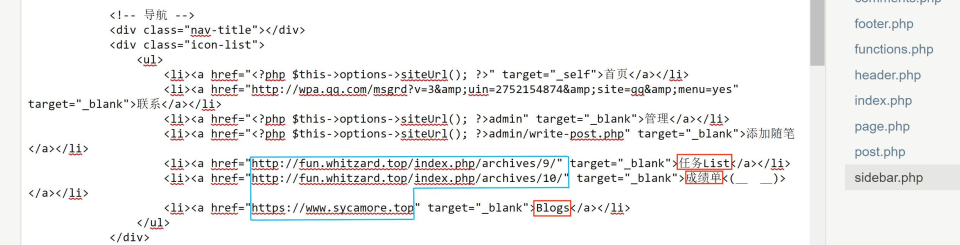
I quite like the sidebar. Its links are in sidebar.php:

Home, Admin and Add post already go to the appropriate pages. For other entries, edit the href and link text. Contact uses a QQ conversation link, with the QQ number following uin= . The screenshots record an older QQ promotion page; I haven’t rechecked whether it can still launch the client today.
Open the QQ promotion page and select Promotion tools → Settings.

Set conversation permissions and save:

When testing, use a different account instead of trying to start a conversation with yourself. Whether the link opens depends on the client and browser. The mobile test I used at the time was only one setup.
# Looking back
I mostly changed configuration and a few links. My favourite bit is still that loading animation (o゚v゚) ノ.